The Killer Bees were a fantastic Austin-based reggae band in the 80s and 90s. Founded by singer Michael E. Johnson and guitarist Malcolm Welbourne (later Papa Mali), they were the first American band to play the Reggae Sunsplash festival in Montego Bay. In the late 80s and early 90s in Austin, they were the shit.
For this post I’m going to focus on a live Killer Bees recording of “Rude Boy”. This show took place at The Back Room in Austin, probably in 1988 or 1989, and was broadcast by KLBJ radio as part of its Local Licks Live series.1
As much as I love the guitar work of Welbourne, this is all about the incredible trombone playing of Wallace Hammond. Learning this solo is a study in melodicism, simplicity, and rhythmic feel. Incredibly, most of the solo takes place within one octave! It’s mostly (but not all) pentatonic and blues scales, so the theory junkies might be bored, but I’d say there’s something interesting for just about any musician here.
Before jumping in, be sure to listen to the whole song. (The trombone solo starts around 6:06.)
Aside from the James Bond / Mission Impossible theme intro (how cool is that?), the chord progression of the song literally couldn’t be simpler:
||:Em|C|Em|C:||
And that’s it! Over and over.
Let’s start with the first passage of the trombone solo. In fact let me start by pointing out that there are passages. As a guitarist, this is one thing I love about learning solos by players of wind instruments. They have to take breaks to breathe, and those silences help establish themes and melody. I don’t have to stop for a breath so if I’m not careful my solo will ramble on without a stop which tends to suck all the dynamics out of it. Here’s the start of the solo:
It’s short, but notice how much he repeats notes. The first note, a D, is played six times in a row, then the next E three times, then the G twice! This probably has something to do with playing the trombone itself— moving that slide around seems like a lot of work which you can minimize when you repeat notes.2 But Wallace Hammond is obviously an expert player so this isn’t done out of laziness. In fact, it’s a theme throughout the solo and the repetition of notes makes for some great rhythmic possibilities.
Which brings me to another important aspect of this first short passage: it establishes a straight 16th note feel. No swing at all. This becomes important later.
More use of note repetition, but this time they’re 8th notes. Also whereas the first passage was all pentatonic, now we begin to hear more of the harmonic center of the chord progression, the aeolian.
Whoa! This is a pretty wild chromatic run of 11 notes. In a way it’s the antithesis of note repetition. The notes in that run are:3
A–B–C–C♯–D–D♯–E–F–F♯–G–G♯–A–A–A
And even though it lands on the first chord of Em, the final note repeated three times is A, which isn’t in Em, giving the passage an unresolved feel. Normally the tendency after that rest would be to resolve, but no…
…instead it gets more dissonant with this odd B / F♯ combination, still over Em. It almost sounds atonal.
It’s finally resolved nicely with a very melodic run that lands on G, the 5th of the C chord that occurs there. But as melodic as that little run was, there’s something odd about it. He plays a C♯ instead of the normal C natural. That kind of just shouldn’t work, so why doesn’t it sound obviously wrong? It would have if the song had gone to C already, but it was still in Em, giving it an Emdorian feel. Even so, 19 out of 20 musicians would have played a C natural there, which would have sounded fine but not special.
Continuing on, he reuses the rhythm of the dorian run to start the next passage which then drops down for another run up the chromatic scale. Except it’s not quite chromatic because he skips from the D to the E before ending with some bluesiness.
Do you hear what happened to the rhythm there? It’s simultaneously both subtle and incredibly impactful, if only subliminally. We’re halfway through the solo and so far all the playing has been straight 16th feel, no swing at all. But suddenly now he throws in a hard swing feel. In fact from here on out, almost all of the solo is swung!
Aside from that, this is just a groovy riff. And it boldly ends on the flat 5, as if to say that along with the new swing feel, things are about to get a lot bluesier on the harmonic front too. Most of the rest of the solo is in the blues scale, using flat 5s a lot.
Here the band goes into a breakdown “calm before the storm” and Wallace uses the shift to play more fluidly, still mixing blues with the aeolian. Also take note of this riff:
…that’s a good one to have in your blues repertoire.
The band exits the breakdown and the solo is finding its climax, leading to some chaos. Wallace is trying to play 16th triplets but that’s so fast and undoubtedly difficult to play on trombone, that they’re a little messy. I love that it’s messy. It adds to the chaos and the feel of risk taking. Exactly what I want to hear at the solo’s apex.
And now at the very end the chaos subsides, the swing feel is lessened but doesn’t return to straight 16s. And whereas so many epic solos will finish with the highest pitch register yet heard, Wallace ends everything with a groovy riff that drops down into the lowest register yet.
Every time I hear this solo, I have to hum along with it. What sticks with me most is how little Wallace actually needs to make it infectious. It’s almost entirely within one octave, with hardly any “fast” notes, and tons of space. I highly recommend that musicians learn this solo note-for-note. It’s fun to play and incredibly instructive. You can download just the trombone solo audio here.
My friends and I wanted to go but couldn’t make it for some reason (this may have been a 21-and-over show), however my buddy Will had a tape deck with a radio, so he recorded it. Later on I took the tape, digitized it, and cleaned it up as best I could. If you like reggae, this whole concert is a real gem. Sadly, I can’t make it available for copyright reasons. However it sure would be a shame if it ever got lost, so if you want to help out by keeping a backup of it, feel free to contact me. ↩
For certain instruments like piano, it can actually be harder to repeat notes, especially quickly. ↩
Wallace may have garbled two of those notes together into one, but I think this is what he was going for. ↩
So this would have been in the fall of 2006 while working on Mac OS X Leopard (10.5). It was during a time when Apple was spending two years each on Mac OS X upgrades1 instead of the normal one we’re now used to. That meant bigger features with more breadth, so even though we had twice the time to get things done, it felt like more work.
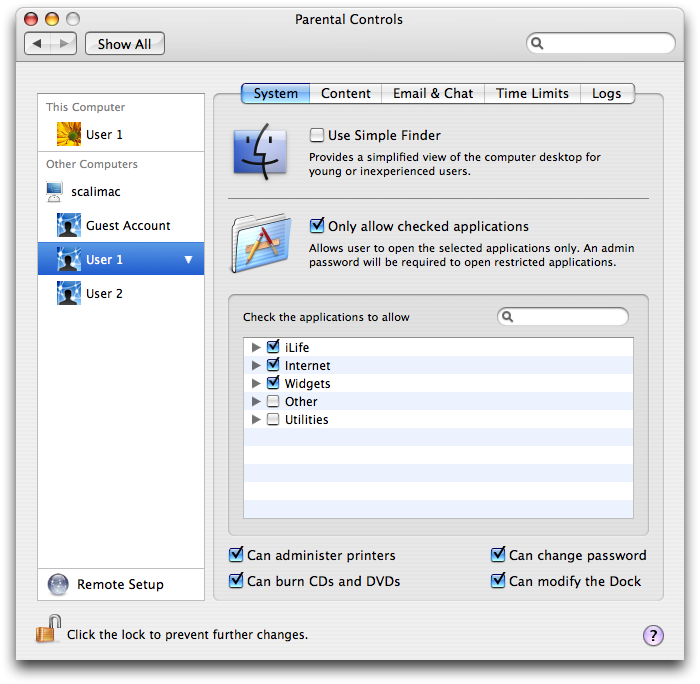
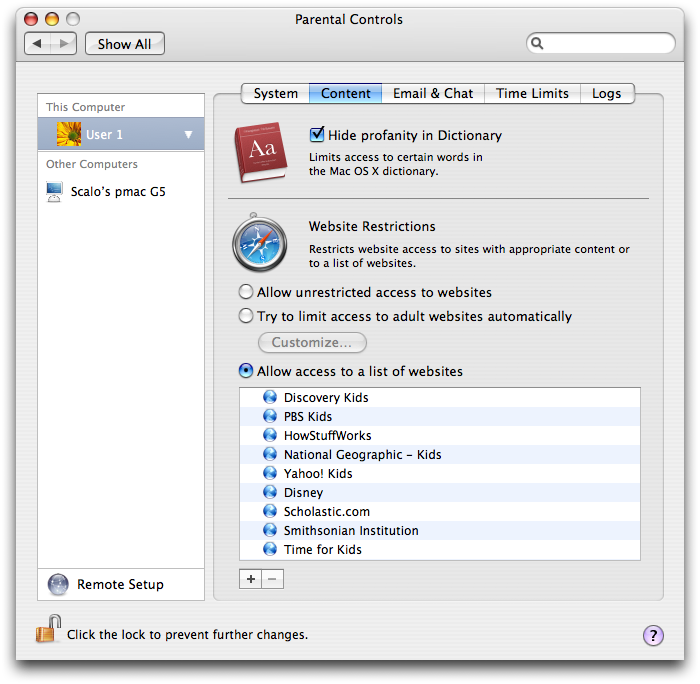
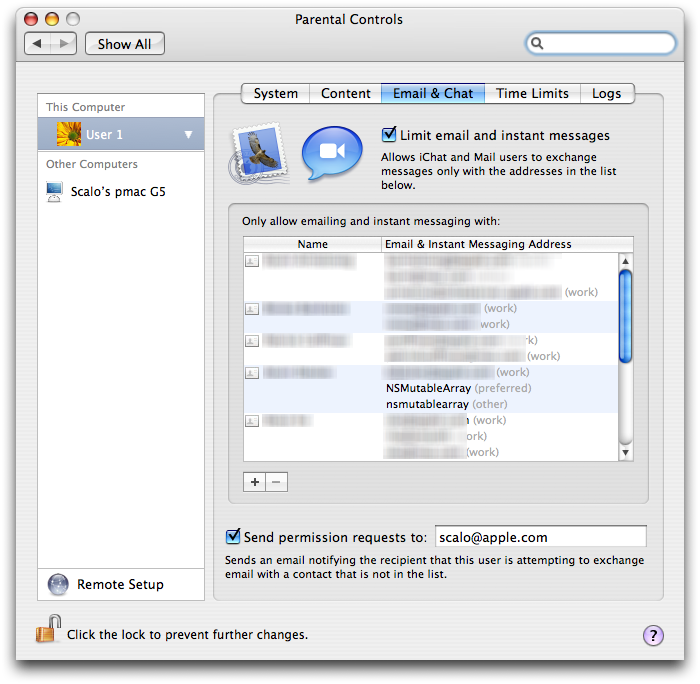
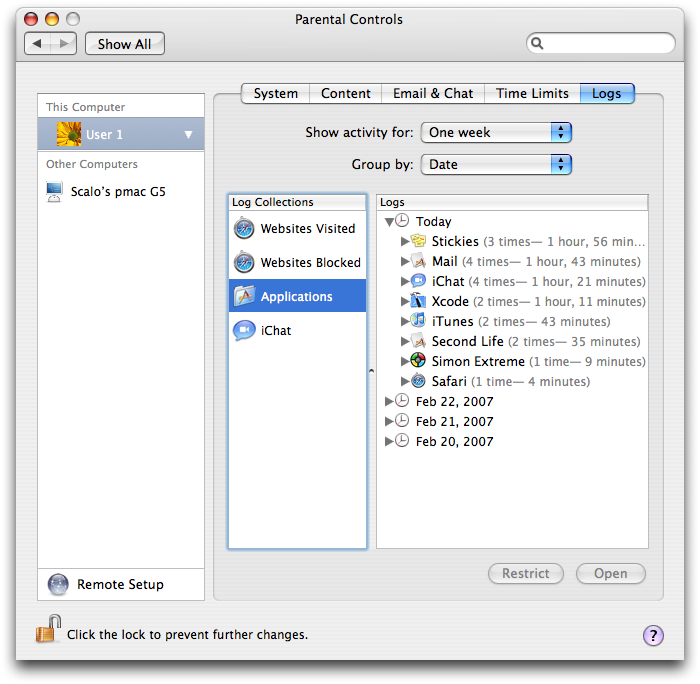
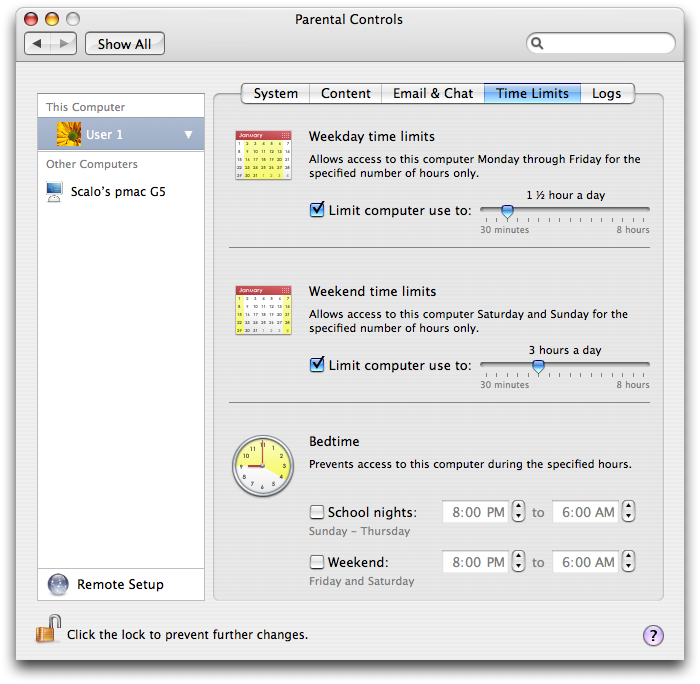
Marketing really wanted some better parental controls2 for the Mac, since up till then we had just had some basic controls shoehorned into Accounts. The list of new parental controls features marketing wanted was pretty extensive for a single release:
App restrictions
Website restrictions
Automatic content filtering
Email permission requests
Email & Chat limits
Activity logs
Time restrictions
I think this was the first major tentpole feature Apple had thrown at me since taking the SWE job a few years prior. Before that the biggest thing I had worked on was probably the Sync part of the .Mac pref pane or maybe the Mosaic screen saver (whose untimely death I still shed a tear for).
I still remember my first interaction with the PM on how robust the parental controls needed to be. He thought as long as it wasn’t hackable by most kids then it would be fine. I thought if even one kid in a school figured out how to bypass it, then they’d share the hack with all the kids. I should have kept my mouth shut.
We had a team of me as DRI3, two newer engineers, and a QA. I codenamed the project “Poppins” (clever, huh?). We took over an office nearby and taped up the windows so passersby wouldn’t get an eyeful.
Of all the features, the content filter was the most daunting. At this point I didn’t know how to do almost any of it. I’d never worked with machine learning, my networking skills were meager, and I knew next to nothing about Python, which we’d use to wrangle the vast amounts of training and testing data into usable form.
“Content filter” of course was basically a euphemism for porn filter, although it did (and still does) include categories for hate, gambling, substance abuse, and violence. Apple made me sign a legal contract stating that if I sustained emotional or mental damage during the course of looking at all this porn, I wouldn’t sue them. I still have it! (The contract, not the emotional damage…)
And the threat was real. Thankfully fellow engineer Giovanni Donelli had a great idea: let’s get ahold of the Safari source code and write our own browser that never shows images. This made working much less awkward, especially considering our QA was a young woman and we were constantly stuck in that office together.
My first big decision was whether to try to write all of this from scratch, or seek out a deal with a third-party. At the time, Apple Engineering was often criticized for having “NIH Syndrome”, or “not invented here syndrome”, meaning that if it wasn’t made at Apple then it’s just not good enough, which is obviously short-sighted.
I took that to heart as I played with the third-party solutions already on the market. Most were pretty much garbage — either they didn’t work or they were easily bypassable — but one did stand out as promising. I managed to get the owner on the phone and we talked, deciding it might be a good fit.
They gave me the source code under NDA and I forked a version for our purposes. After some tuning on our test/training material, it seemed to work pretty well! I was optimistic — the most daunting part of the project might just turn out to be the easiest. As we polished and fixed more bugs, the feature was eventually deemed ready for an “HI demo”.
“HI demos” are hard to explain. HI of course refers to the Human Interface group at Apple, but at that time these demos always included Kevin Tiene, director of Mac engineering, Greg Christie, director of HI, Scott Forstall, VP of Platform Engineering, Bertrand Serlet (sometimes), as well as all the EPMs, managers, and designers (a young Mike Matas was the HI designer for parental controls).
The demos would take place in a large open studio hallway space in a wing of IL3. The entire wing was then on secure lockdown because of some secret project that the rest of us weren’t supposed to know about. That project of course was iPhone, then known as “Purple”. (Every time there was a meeting or demo there we had to wait forever while they cleared out all the incriminating whiteboards and such from the open area.)
At this particular demo, there were about 40 people in attendance and I was to show off for the first time how the new parental controls worked, including the content filter. Because the hall was so large with so many people, the demo Mac was projected onto a large wall at the end that was probably 16 feet tall.
I worked through my script and everything went well. The content filter part of course was a little awkward, but I tried to load “penthouse.com” in Safari and the content filter successfully blocked it. Whew! The Demo Gods are with me!
But then suddenly Scott Forstall comes over and shoos me out of my chair. He looks around the room and I still remember his exact words: “OK everyone, I’m serious. Is anyone going to be offended if something shows up on the screen? I’m totally serious about this. Anyone? Anyone? I’m serious.” We all knew exactly what he meant but no one budged or said anything.
I was now freaking out a little. This isn’t part of the script! And what the hell did he even plan to do? The system worked by refreshing a HUGE blocklist of porn sites every few days. Did Scott Forstall know of such niche porn sites that they wouldn’t be on the blocklist?
Scott went to Safari and typed into the address bar: google.com. Embarrassingly, I still had no idea what he was up to. Then he went to Google preferences, then Safe Search. My heart started to sink. One more time from Scott, “I’m serious y’all, is everyone OK with this?” The hall was quiet. He switched Safe Search to Off.
The problem of course was that the software used a blocklist of bad domains, and obviously google.com was not on any blocklist! Scott googled “porn” and within seconds, projected onto a 16-foot wall in front of 40 people, was a large grid of hardcore porn. He left it up for a beat longer than I thought was necessary as if to make a point, then closed the window.
There was a little bit of chuckling but nothing was said. That was the end of the demo.
Over the next six months I wrote the content filter from scratch, if you can believe it, as an Apache module (because Apache web servers shipped on every Mac at that time) configured as a reverse proxy. And instead of massive blocklists of bad sites, we used this new technology called “machine learning”. It actually worked pretty well!4
As a final coda to my experience bringing parental controls to Mac OS X Leopard, it turns out that the content filter wasn’t actually the hardest part. During a demo to Steve Jobs that I wasn’t present for, 3 weeks before the WWDC announcement and a mere 3 months before ship, SJ casually remarked, “Oh, and I don’t want to have to walk upstairs to Reed’s bedroom every time I want to change something.” So the word came down: oh, by the way, all of this needs to work remotely. That was the hardest part.
It was almost 2 1/2 years between Tiger’s release and Leopard’s. ↩
Marketing actually wanted to call it “Family Controls”, which they felt was softer. So I began building the components that way. But at some point my manager put his foot down, “What are we doing? Everyone calls it parental controls. Family Controls is just weird!” So we switched it, except for my FamilyControls.framework which by that point was already used by too many other components on the system so to this day that’s still what it’s called. ↩
At Apple a “DRI” was the “directly responsible individual”. Basically a project or tech lead. ↩
For Snow Leopard we rewrote it yet again, this time as a much more sensible network kernel extension. Giovanni codenamed this project “The Holy Inquisition”. ↩
I’m really excited to start the AppTraction beta! I’ve been working on it on and off for almost a year, and it finally feels polished and useful enough to share.
AppTraction is a little hard to sum up, but my working tagline for it is:
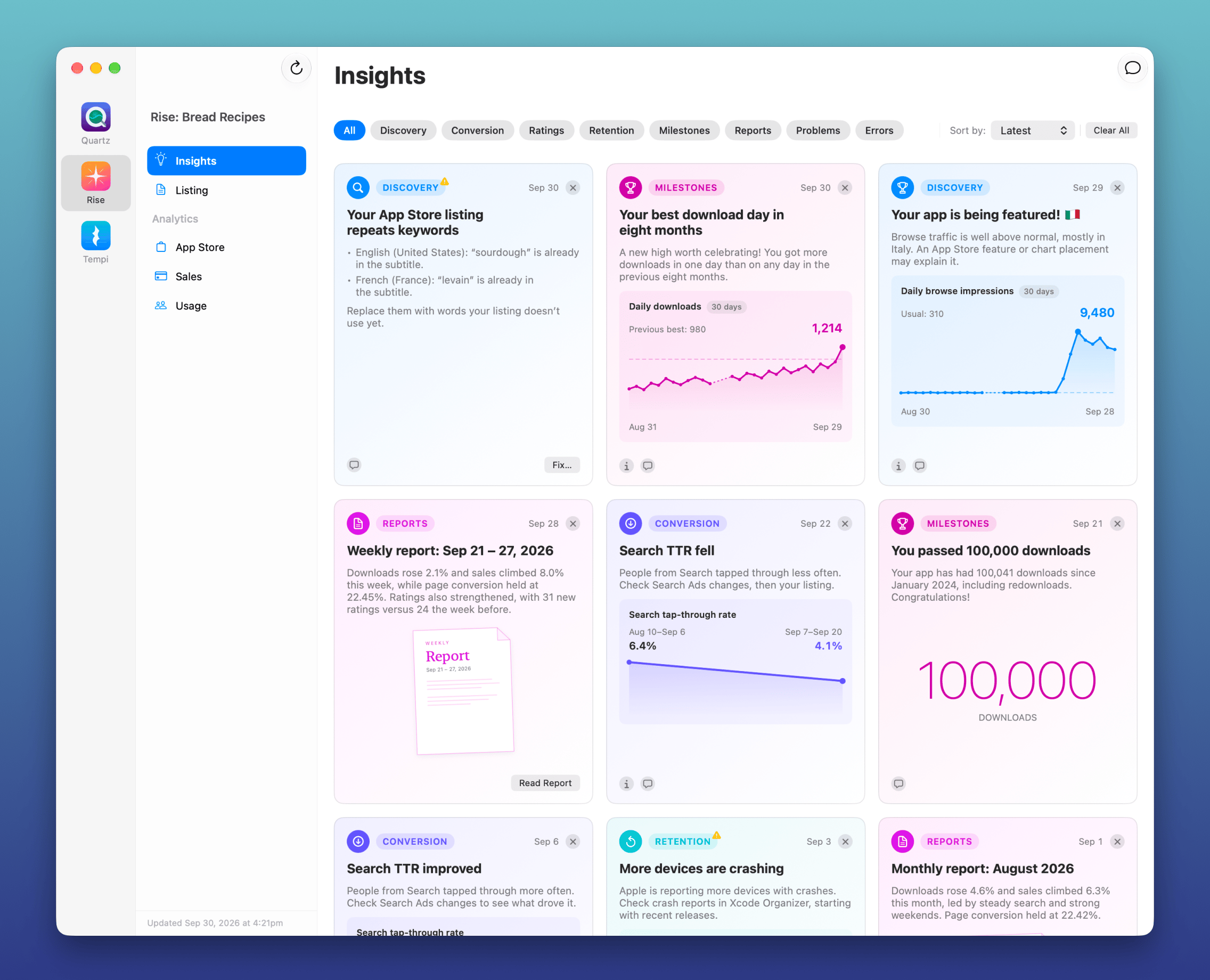
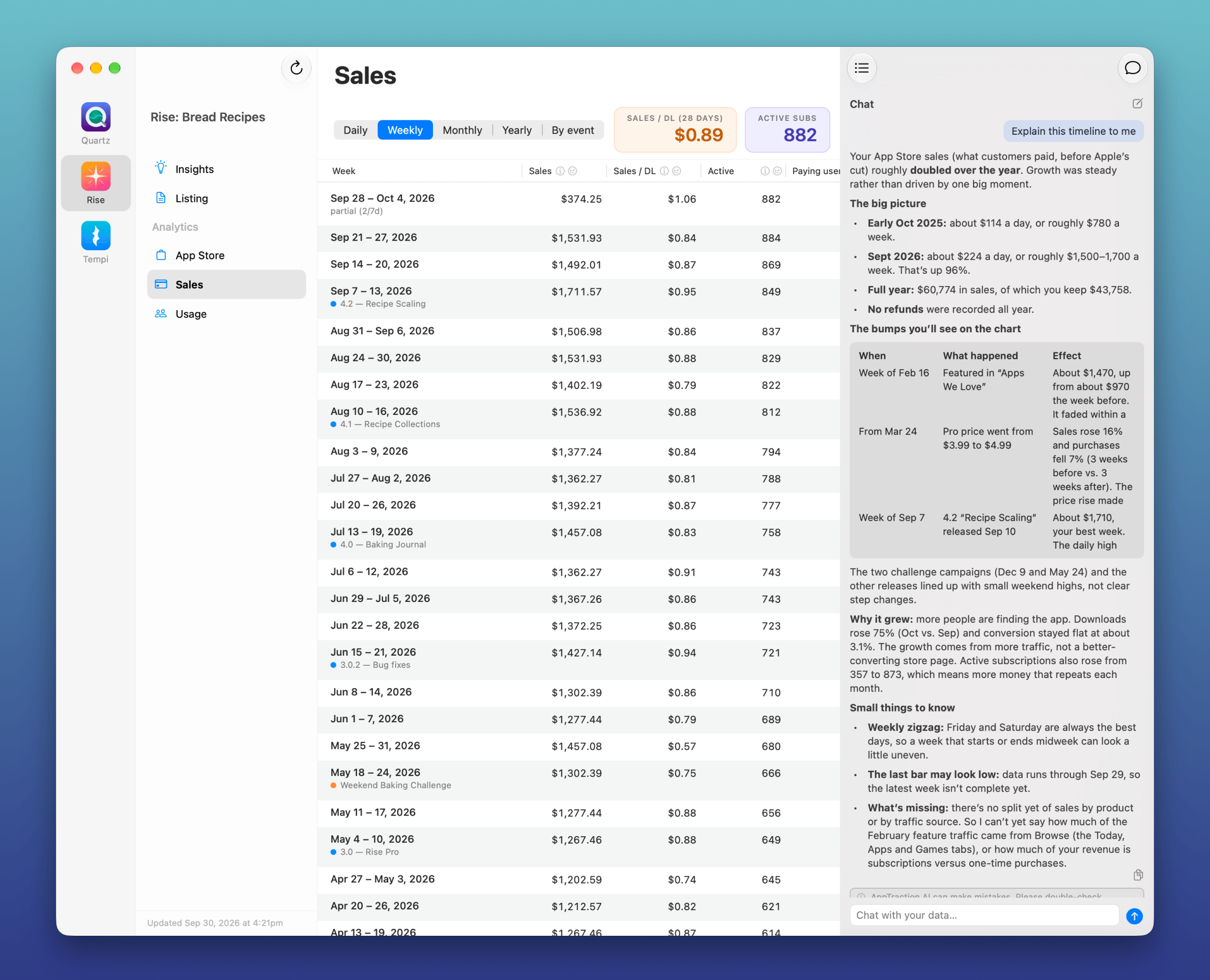
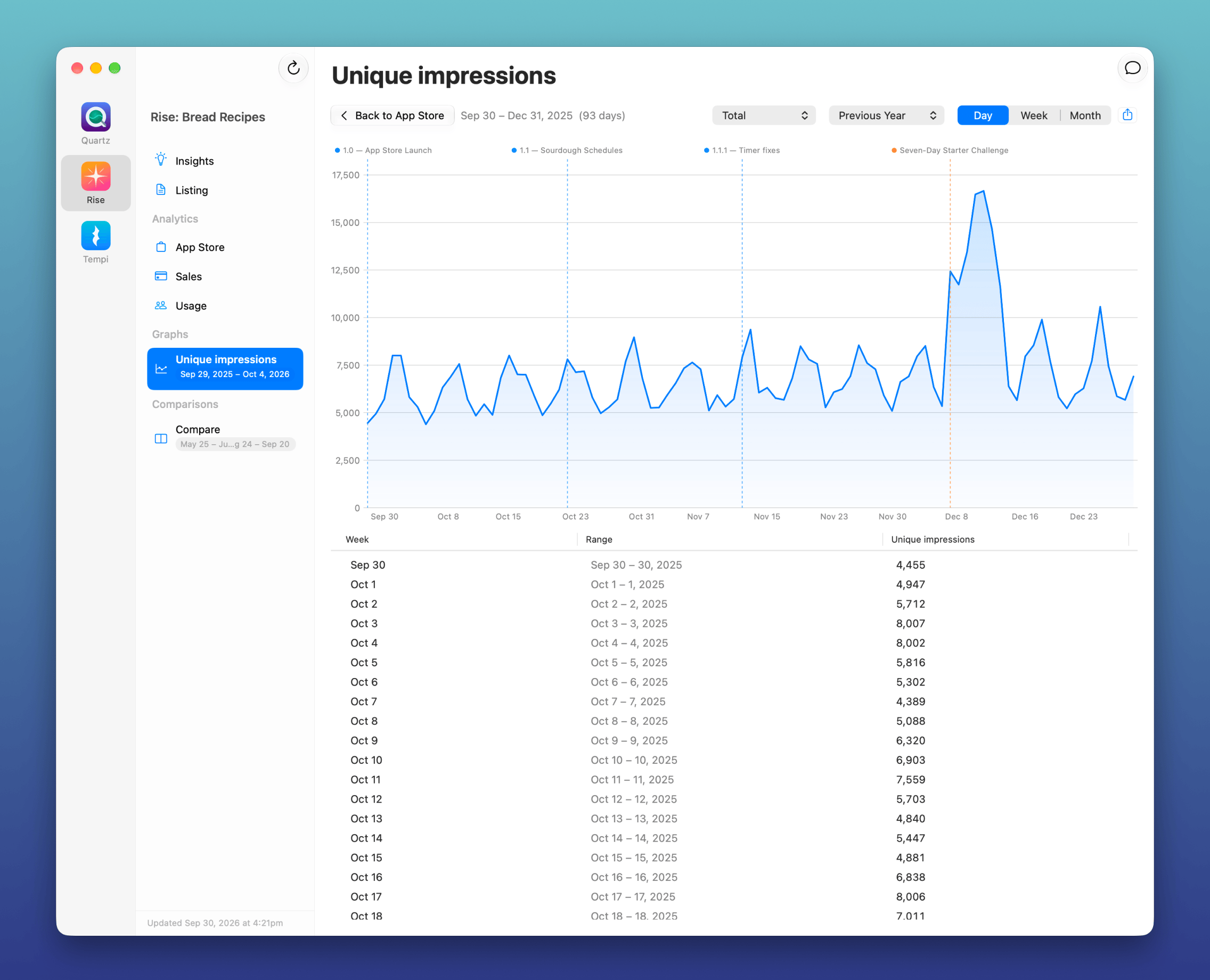
AppTraction brings App Store Connect analytics to your Mac and transforms data into answers. Get insights, spot problems, and “chat with your data” using a powerful AI.
Additionally, it:
Watches your data in the background and flags issues, milestones, and trends
Shows your App Store Connect data and charts instantly
Lets you chat with AI about your listing, sales, and trends
Primes that AI with Apple tech talks and WWDC session transcripts
And it all runs locally on your Mac.
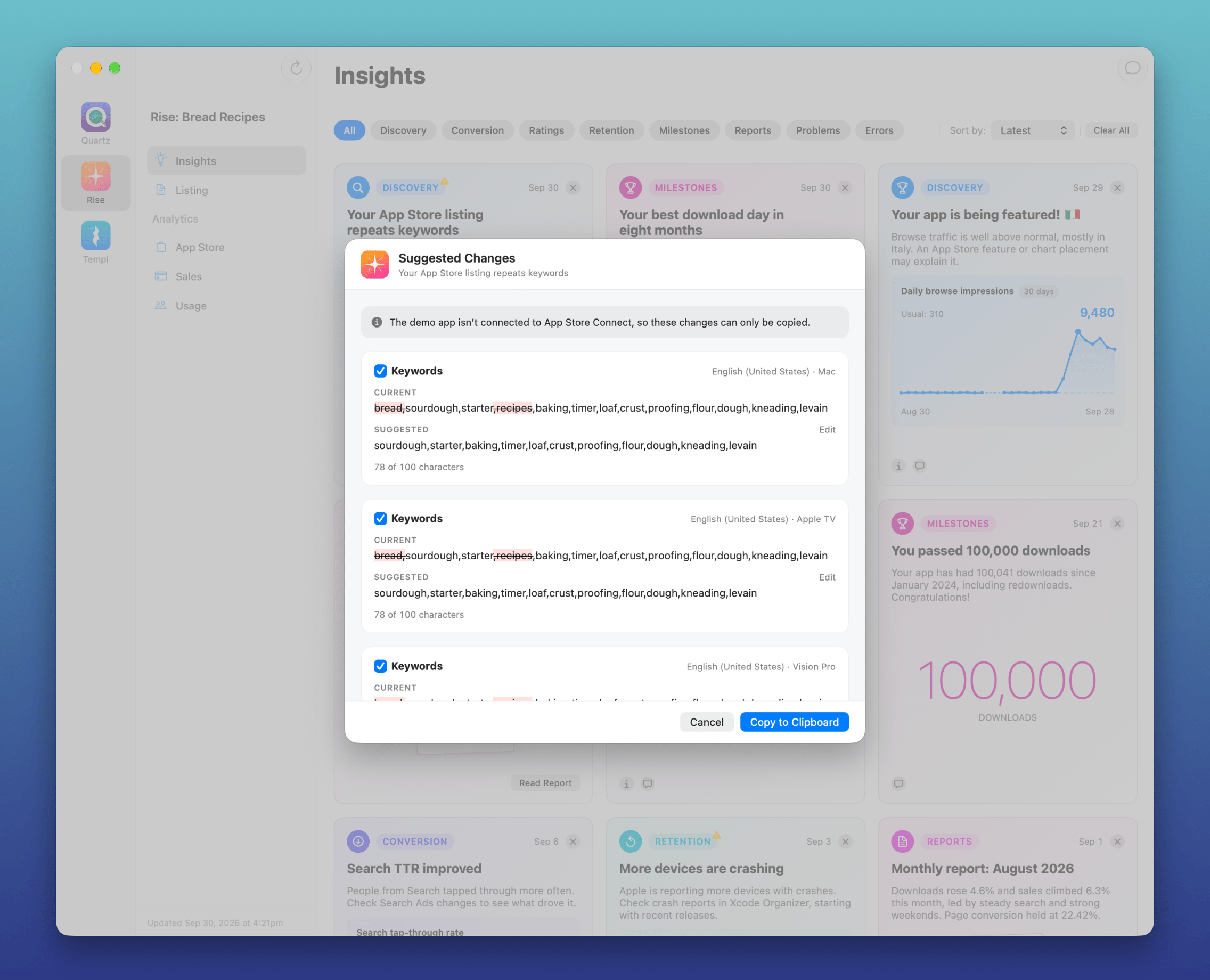
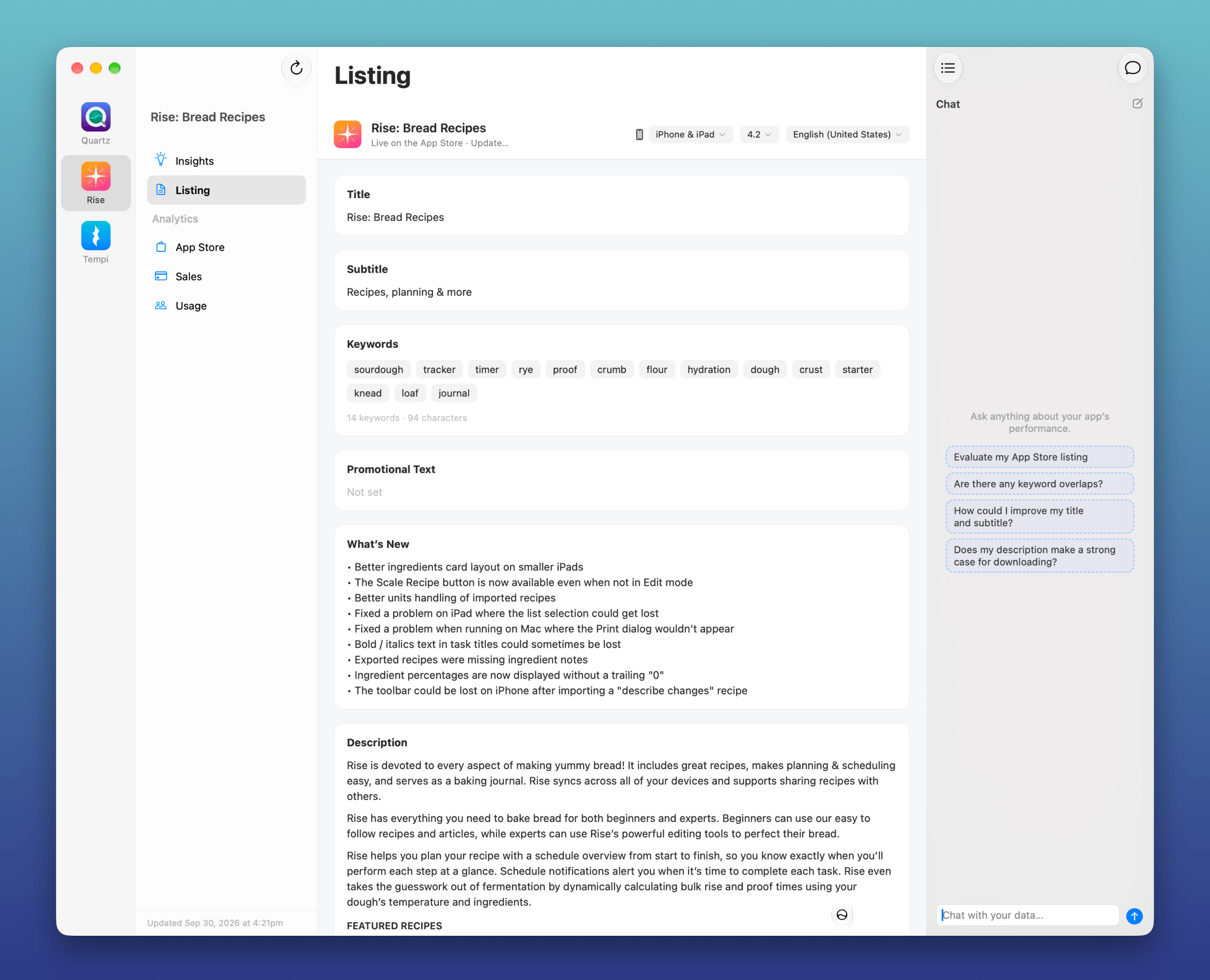
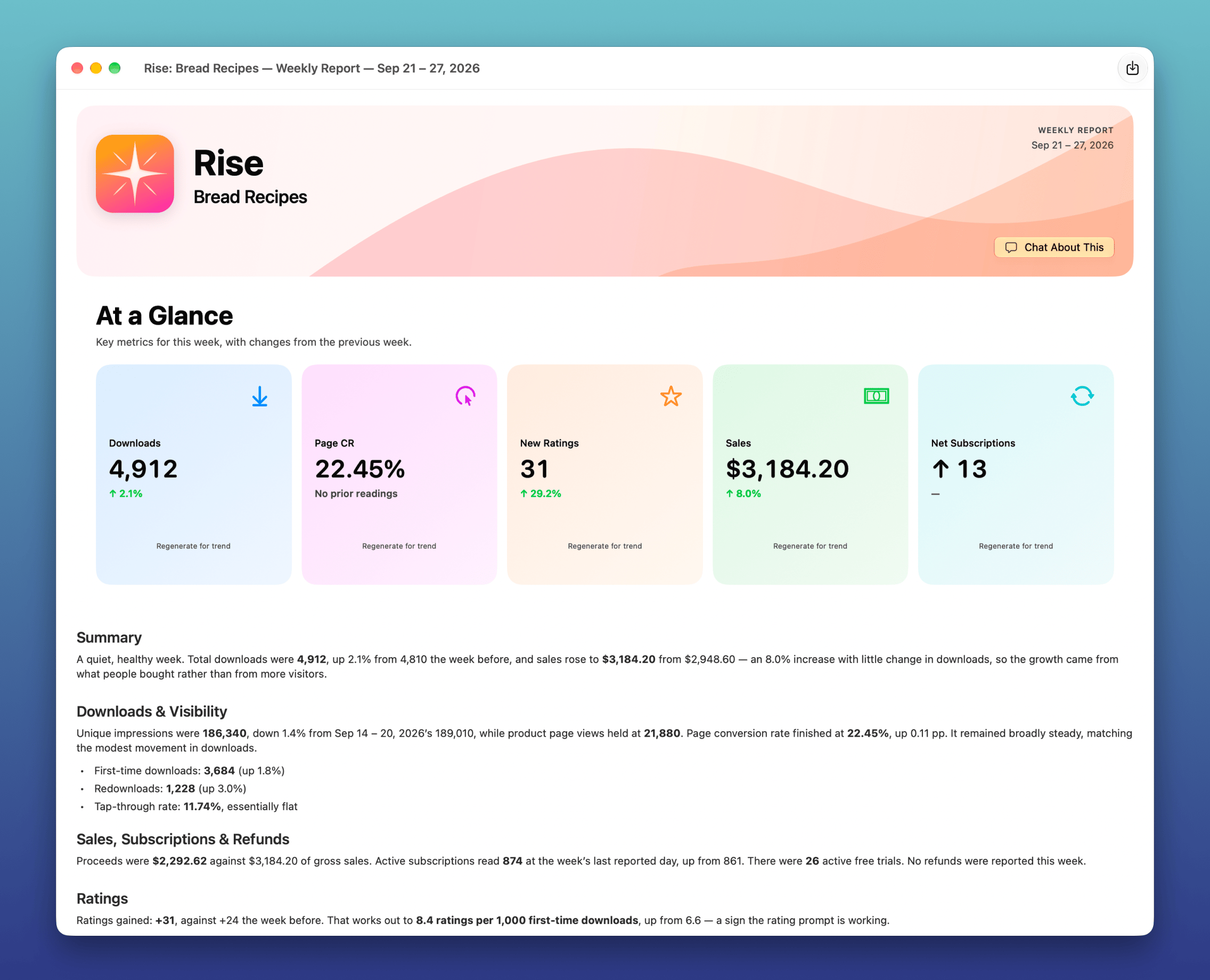
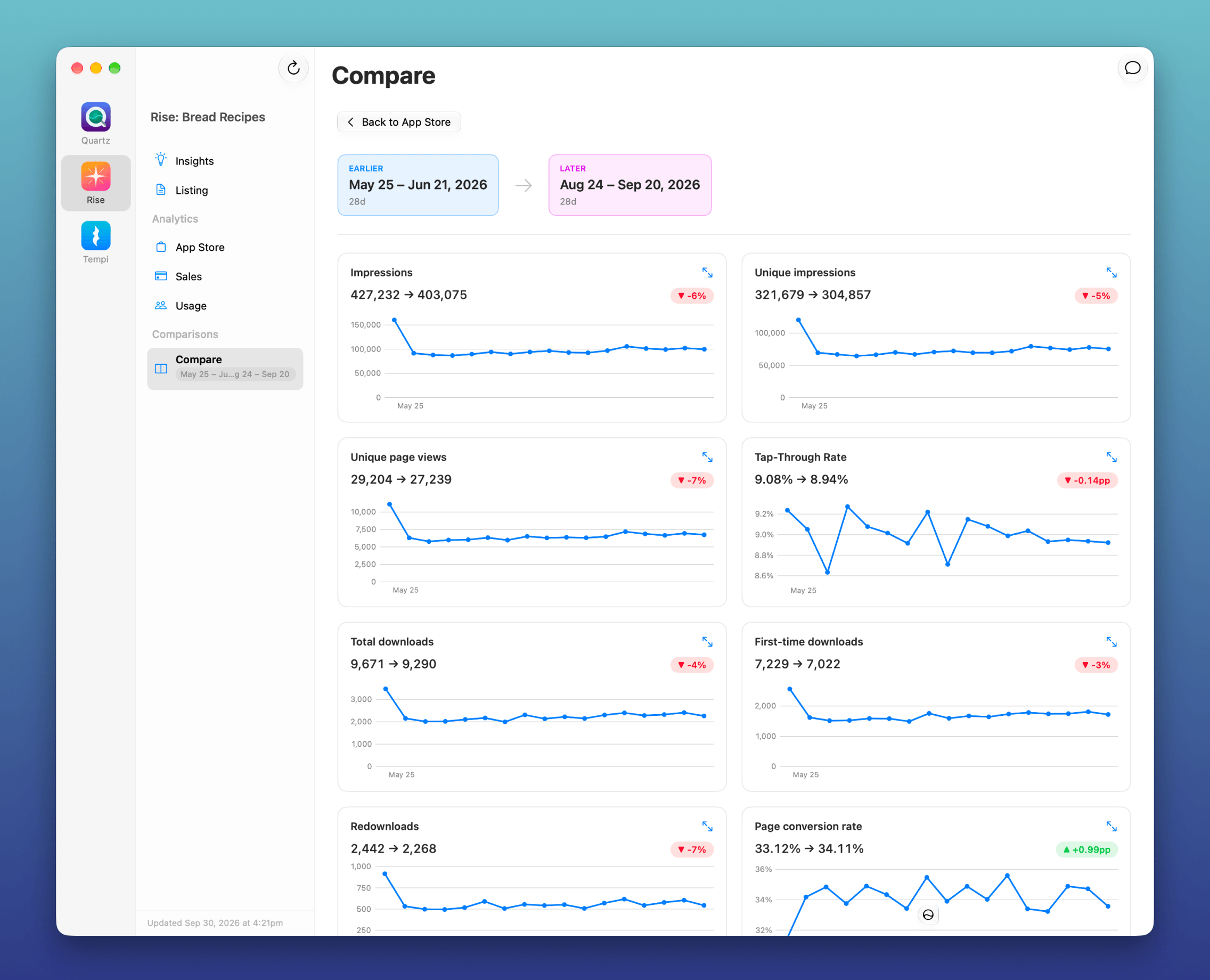
Hopefully some screenshots will better convery what it does:
If you’re an iOS dev (or any 🍎 platform dev) and want to try it out, I’d love to get your feedback.
Download it at apptraction.dev and use this invite code: SCA1026-INVITE
After being dormant forever, this site is alive again! I’m pulling in some bloggy stuff from my Threads, Reddit, and Made by Windmill, but plan on adding more homegrown content on an ongoing basis.
And not that anyone was listening to it, but the music archive is still here, in /music.
I was just reminded of this story about my old buddy Nigel. About 30 years ago (yes, really!) I made a Mac app called File Freak. It was basically Spotlight before anything like Spotlight ever existed. But I needed an app icon.
Nigel was a great artist but had only ever worked in the analog world. Still, when I told him about what I needed he said he was game to try. So I (ahem) “lent” him a copy of Photoshop, and a week later, he delivered this cute icon. It was perfect!
I was so impressed that I asked him to show me his process in Photoshop. We sat down. He went to the pencil tool, set it to 1x1 px, zoomed all the way in, and started clicking on pixels one at a time. ONE FUCKING PIXEL AT A TIME. It was only a 32x32 icon (I think, at the time?), but still that’s a lot of clicks!
After I was done laughing my ass off, he said “what’s so funny?”, and I showed him the pen tool, region fills, layers, etc. He was like, “eh, I prefer my way”.